Mint Card explained
The Mint Card is the detail view you get by clicking any mint on the Calendar. It bundles every signal Daily-Mints has on a collection into one screen.
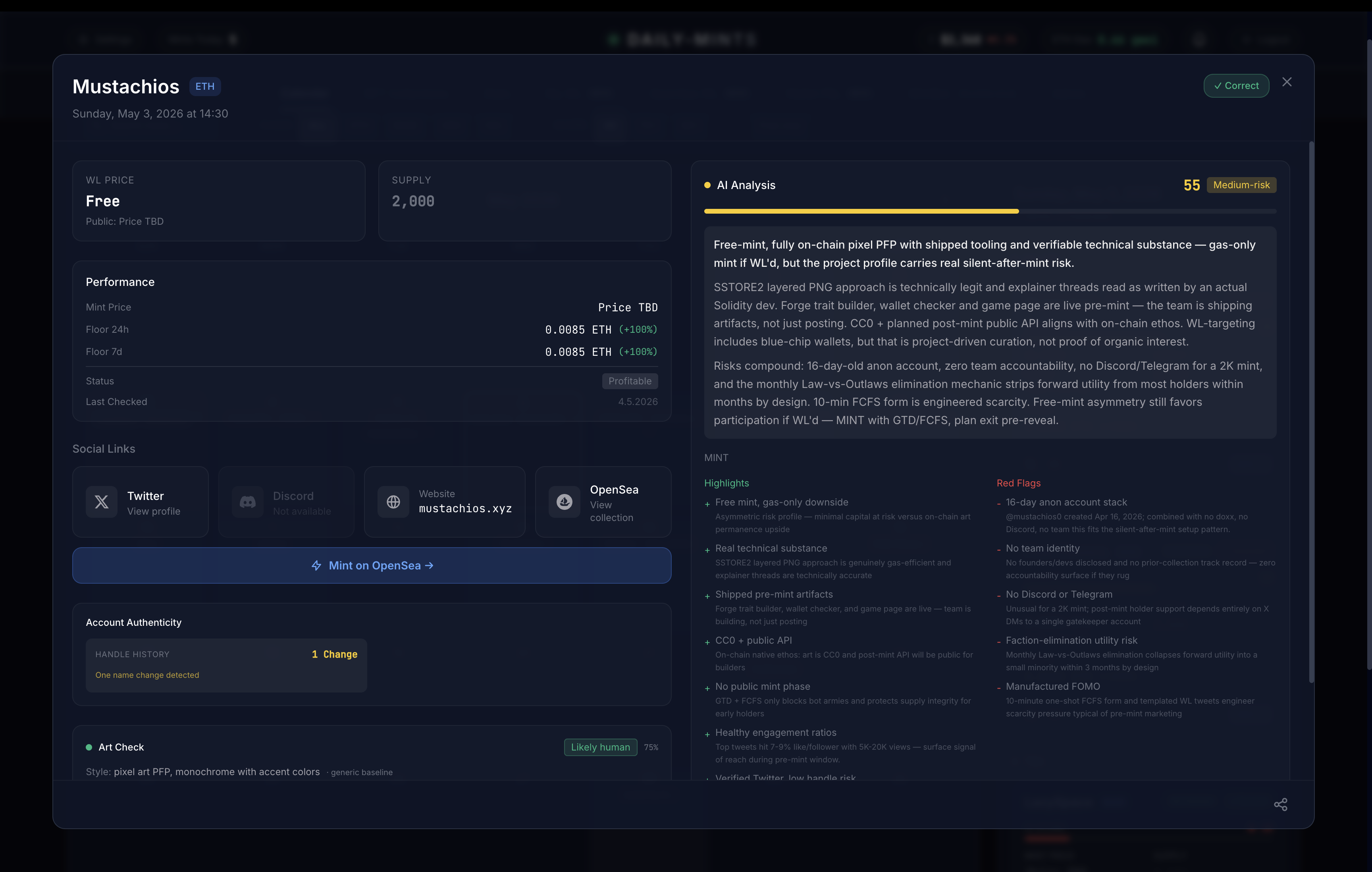
Header
Collection name, chain badge (ETH or BASE) and the scheduled mint date. A "Correct" badge appears once the AI verdict has been validated against the actual mint outcome.
Price + supply
- WL Price — what whitelisted wallets pay (only shown when a WL phase exists). The public price is rendered as a sub-line below.
- Mint Price — the headline price when there is no WL phase
- Supply — total mintable count
Either price can show as Price TBD or Free if the team hasn't published a number yet.
Performance
Only populated once the mint is live. Shows:
- Mint Price — what the collection minted at
- Floor 24h and Floor 7d — current floor and percentage move over each window
- Status — the lifecycle of the mint (Active, Dead, Profitable, Sold out, …). Active and Profitable are green, Dead is red.
- Last Checked — timestamp of the latest floor refresh
Floor numbers are pushed live via WebSocket the moment a listing changes.
AI Analysis
The right-hand panel. Top of the panel shows the score (0–100) and a coloured risk band — hover the bar to see what each band means.
Below the score: a one-paragraph plain-English verdict, then two columns — Highlights (what's working in the collection's favor) and Red Flags (what to be cautious about). See AI Score explained and Red Flags.
Social Links
Direct links to the collection's Twitter, Discord, Website and OpenSea page. Any link shown as "Not available" means Daily-Mints couldn't find a verified one — usually a yellow flag for a 2K+ supply mint.
Mint button
One-click jump to the mint page (collection homepage pre-mint, OpenSea post-reveal). Doesn't trigger a transaction — it just routes you to the right place.
Account Authenticity
Two side-by-side signals on the collection's Twitter account:
- Bot Score — 0–100 estimate of how much of the follower base looks bot-driven. Green ≤20 (Clean), yellow ≤40, orange ≤60, red beyond. Real-follower estimate appears below the bar when available.
- Handle History — how many times the Twitter handle has been renamed. Zero changes is green; one change is a yellow flag; two or more is red. Handle reuse is a known rug pattern.
Art Check
A vision pass on the collection's art:
- Verdict pill — one of Likely human, Likely AI, AI-generated (the strong-confidence variant of Likely AI), or Uncertain
- Confidence % — how certain the model is, shown next to the pill
- Style line — short summary of genre, plus a
· common styleannotation when the style isn't distinctive
A "Likely AI" or "AI-generated" verdict is not automatic disqualification, but it does feed the score.